Lease management software
with the lifecycle wired in.
Every state from draft to termination, ECTA-aligned digital signing with geolocation, renewal-intent capture, review-request workflow, and a lease history that does not break across renewals.
- Digital signing (ECTA)
- Multi-tenant leases
- Renewal intent capture
- Termination workflow
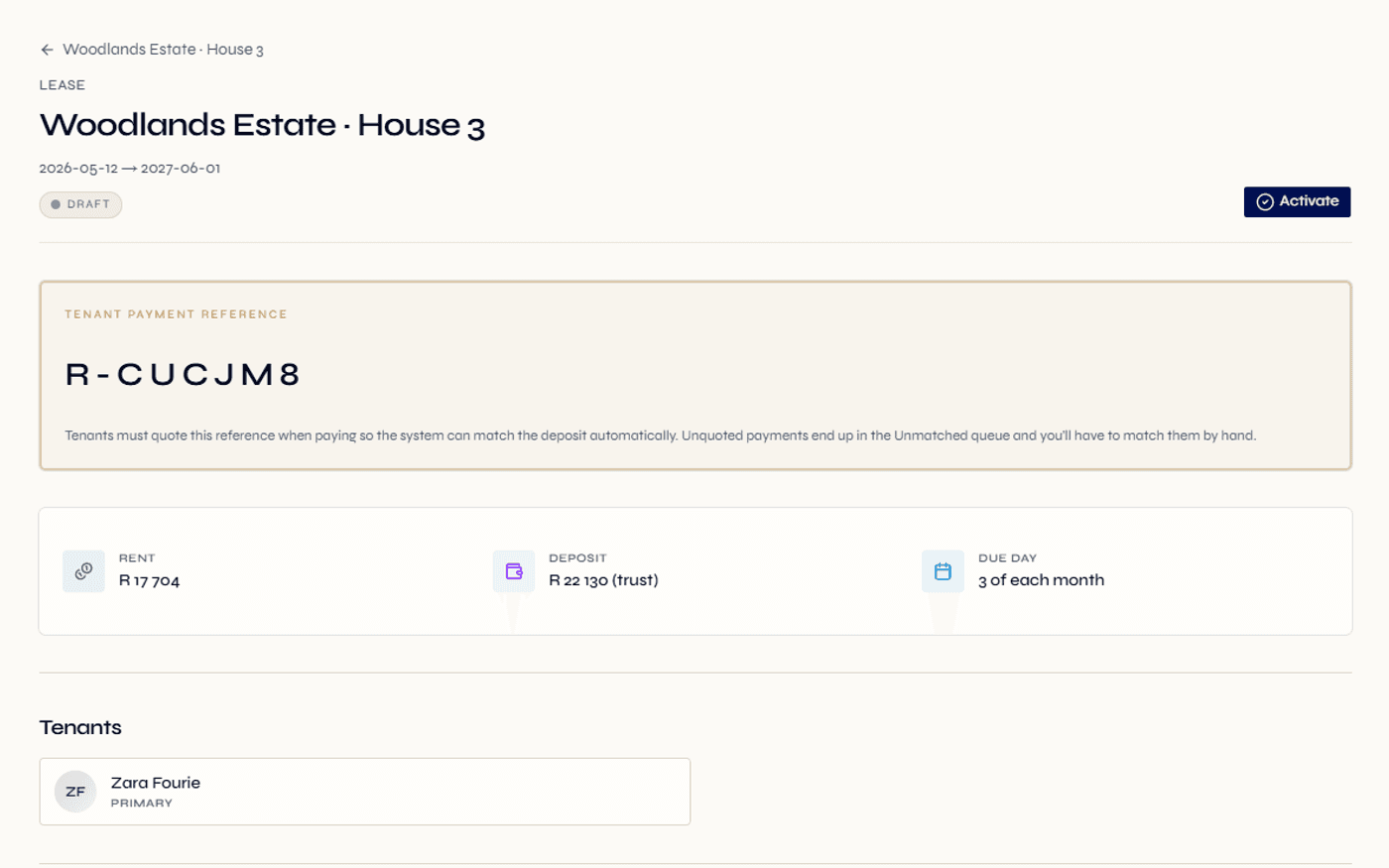
Draft, active, ending, terminated and renewed — every transition logged.
Signature, name, IP, device and browser, timestamp and geolocation captured per tenant.
Every lease gets a permanent reference code, generated when the lease is created.
A lease is not a document. It is a moving operational record.
Many rental teams treat the lease agreement as a one-time artefact — drafted, signed, filed away. That is exactly where the data fragmentation begins. The lease drives rent invoicing, deposit handling, maintenance dispatch authority, renewal timing, termination workflows, and end-of-tenancy reconciliation. If the lease record is dead documentation, every downstream workflow has to reconstruct context.
Regalis treats the lease as a living record. Every state transition is logged. Every signature is recorded with the data ECTA requires to make it legally robust. Every review request the tenant raised before signing stays attached. Every renewal points back to its predecessor so the lease history reads as a continuous tenancy timeline, not a stack of disconnected PDFs.
When a dispute arises three years into a tenancy, the team does not have to email "remember that lease we signed back in 2024?" — the lease is right there in the platform, with the original signed document, the geolocation of the signature, the review requests the tenant raised, the renewal that happened later, and every invoice that ran against it.
Read the full guide
What lease admin looks like without it
- Lease agreements are drafted in Word, signed on paper, scanned, and emailed back — with no version control.
- Lease renewal is a calendar reminder; nobody remembers which leases are within the expiring window until the tenant brings it up.
- Termination notices arrive over WhatsApp, get screenshotted into an email thread, and the effective date is half-recalled.
- Move-in and move-out inspections are PDFs filed in a Dropbox folder, with no link back to the lease they belong to.
- When a tenant disputes a clause they never agreed to, nobody can prove what version they signed.
What it looks like in Regalis
- Drafts start as draft leases; activation moves them to active; the signed document is stored against the lease.
- The expiring window is configurable for your business; a dashboard tile counts approaching renewals and a tenant renewal-intent flow drives them.
- Termination is a structured workflow with the notice ground, effective date, reason note and the team member who recorded it.
- Inspections (move-in, move-out, interim) attach to the lease with condition ratings, photos and sign-off status.
- The signed lease, the signature record (name, IP, device and geolocation) and the review-request history all live directly on the lease.
From draft to termination, on one record.
Draft the lease
After applicant approval, a draft lease is created with the commercial terms (rent, deposit, start, end, notice period). The lease document is generated or uploaded, and the permanent reference code is assigned.
- Stays in draft until activation
- Permanent reference code
- Lease document attached
Tenant reviews & signs
The tenant opens the portal, reviews the lease, flags any clause concerns through the review-request workflow, and signs electronically. The signature captures name, IP, device and browser, timestamp and geolocation. Multi-tenant leases capture a signature per tenant.
- Review-request flow with PM response
- Multi-tenant signing (primary + co-tenants)
- Geolocation captured for evidence
Lease goes active
The lease transitions to active. A move-in inspection can be scheduled; rent invoicing starts on schedule; deposit accounting kicks in; tenant portal access lights up.
- Rent invoice schedule starts
- Deposit recorded in trust ledger
- Move-in inspection workflow available
Renewal, ending, or termination
As the end date approaches, the lease enters the expiring window. The tenant captures renewal intent through the portal. If renewed, the new lease points back to its predecessor. If notice is given, the platform moves the lease cleanly from ending to terminated with the move-out workflow.
- Renewal intent capture in tenant portal
- Notice grounds and effective date captured
- Move-out workflow and inspection sign-off
Everything you need to keep the lease live.
Lifecycle states
Draft, active, ending, terminated, renewed — every transition logged with timestamp and acting user.
Digital signing
Tenants sign in the portal. Each signature captures the signed name, IP, device and browser, timestamp and geolocation — separately for every tenant on a multi-tenant lease.
Permanent reference code
Every lease gets a permanent reference code, assigned when the lease is created and used as the human-friendly identifier across portals and statements.
Multi-tenant leases
Couples, families, co-tenants — each tenant has their own signature, their own portal access and their own statements.
Lease documents
Signed lease, addenda, amendments — all attached to the lease with version history and retention-aware policies.
Review requests
Tenants flag specific clauses before signing. The property manager responds, and each request moves from open to accepted, rejected or resolved — with a full record of the negotiation.
Renewal workflow
Configurable expiring window surfaces leases approaching their end date. Tenant captures renewal intent in the portal. New lease points back to its predecessor.
Termination workflow
Capture the notice given date, the notice ground (landlord or tenant, non-renewal or notice), the effective date, a reason note and the team member who recorded it — for a clean, documented termination.
Move-in / move-out
Move-in and move-out timestamps, with inspection records and condition ratings per room or item.
Lease balance
On-demand outstanding-amount calculation per lease — what is invoiced, paid and remaining. Visible in landlord portal and on the staff lease detail.
Lifecycle notifications
When a lease is activated, terminated or renewed, the platform notifies tenants, landlords, managing agents and property managers, and can notify connected systems too.
Retention controls
Lease documents have a configurable retention window, designed to support POPIA-aligned retention. A legal-hold setting keeps documents in place during any active dispute.
What South African law actually says about electronic signatures.
The Electronic Communications and Transactions Act (ECTA) of 2002 recognises electronic signatures as legally valid in South Africa, with the exception of a short list (wills, alienation of land, suretyships under the NCA, etc.). Residential leases are explicitly permitted. The question is not whether you can sign electronically but whether you have captured enough evidence for the signature to stand up.
ECTA distinguishes between an ordinary electronic signature (anything that signifies intent) and an Advanced Electronic Signature (which requires accreditation). For most rental contexts an ordinary electronic signature is sufficient, provided it is reliable for the purpose — identity, intent, integrity of the document, time and place of signing.
Regalis is designed to capture exactly that: the signed name (intent), the IP address and device details (identity context), a tamper-evident record of the document (integrity), the timestamp (time), and the geolocation (place). For higher-stakes commercial leases or particular tenant preferences, you can always attach a wet-signed PDF to the lease — the digital signature record sits alongside, not instead.
Continue exploring how Regalis handles the rest of the rental operation.
Tenant screening
The applicant flow that feeds into a clean lease draft — TPN, affordability, compatibility, consent.
Read moreRental arrears collection
Once a lease goes live, the arrears workflow takes over the money side.
Read moreTrust accounting
Lease deposits and rent flows feed into trust-accounting workflows designed to support South African property-practitioner requirements.
Read moreCommon questions
Common questions about lease management.
What lease lifecycle states does Regalis support?+
Draft, active, ending, terminated and renewed. Drafts hold pre-activation leases; active is the live tenancy; ending means notice has been given on either side; terminated is the post-end state; renewed links the new lease back to its predecessor. Every transition is recorded in the audit trail and tied to the team member who performed it.
How does digital lease signing work?+
A tenant opens their portal, reviews the lease document, and signs electronically. The signature captures the signed name, the IP address, the device and browser, the timestamp and the device geolocation (latitude, longitude and a readable location). Signatures are stored per tenant per lease, so a multi-tenant lease records each signature separately.
Is electronic signing legally compliant in South Africa?+
Electronic signatures are recognised under the Electronic Communications and Transactions Act (ECTA) provided certain conditions are met. Regalis is designed to capture the evidence ECTA looks for in most rental contexts — identity, intent, integrity of the document, and the time and place of signing. For high-stakes commercial leases, you can still attach a wet-signed PDF to the lease if required.
Can tenants request a lease clause review?+
Yes. A tenant can flag a specific clause during the signing flow and add a note explaining their concern. The property manager sees the request in their queue, responds, and the response is kept on record against the lease. This avoids the all-too-common situation where a tenant signs under duress and disputes a clause later.
How are renewals handled?+
Expiring leases surface on the dashboard inside a configurable window. The tenant captures renewal intent (renew or decline) through their portal. If they renew, the new lease points back to its predecessor — preserving the tenancy history.
What about lease terminations?+
Termination is a structured workflow with notice given date, notice ground (landlord/tenant × non-renewal/notice), effective date, reason note and the user who recorded it. Move-out timestamp plus the inspection workflow capture the actual handover.
Can multiple tenants share a lease?+
Yes — common for couples, families and co-tenants. Each tenant signs separately, gets their own portal access, and statements can be issued per tenant or for the lease as a whole.
See everything built for you — explore the agencies hub
Run the lease lifecycle on one
connected record.
Walk through the lifecycle, the signing surface, and the renewal workflow with someone from the team.