
Tenant screening software with integrated TPN credit checks
Screen tenants properly, before the lease starts.
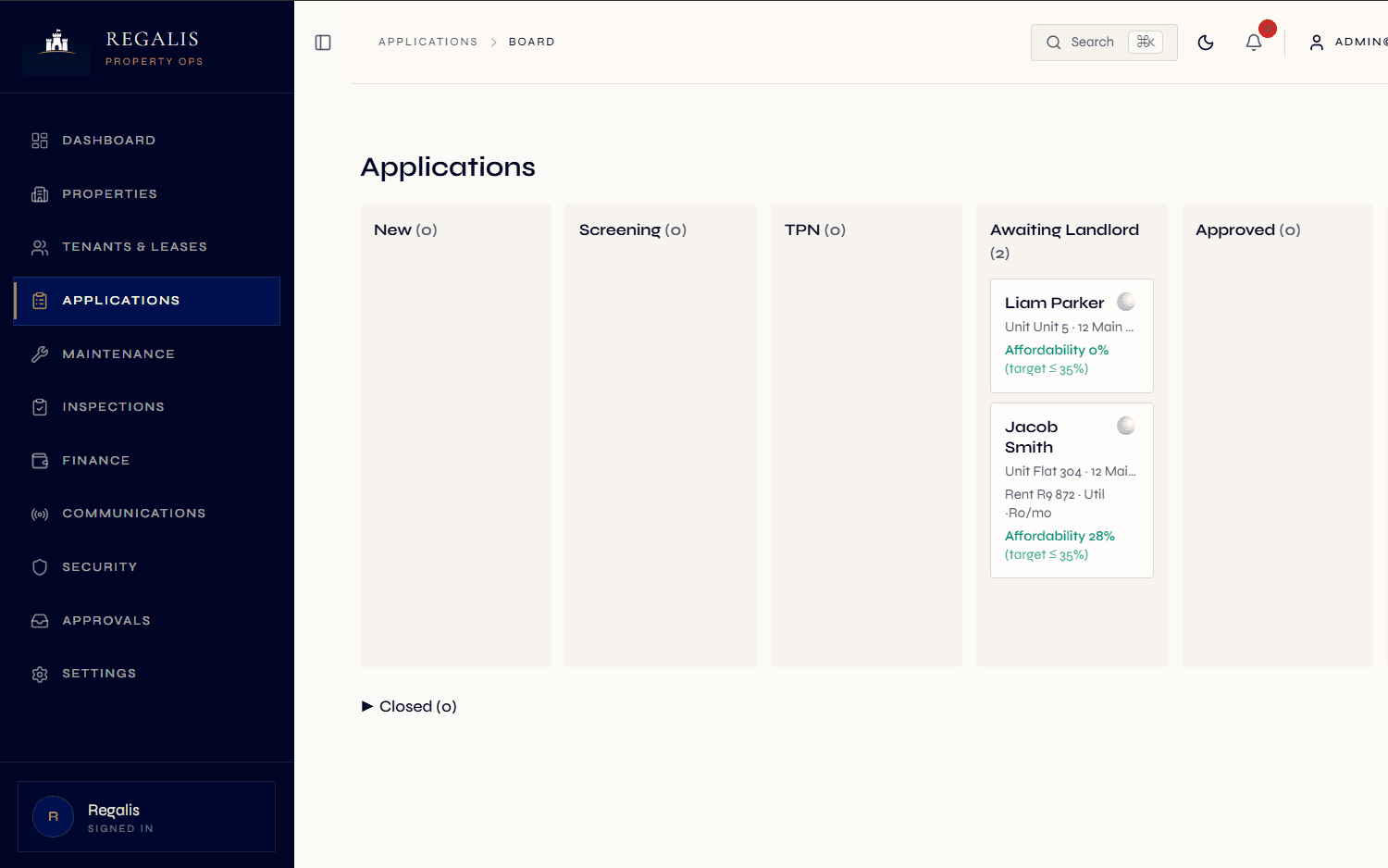
Designed to support POPIA-aligned consent capture, native TPN credit reports, automatic affordability scoring, lifestyle compatibility flags, and a 6-column applicant board — all woven into the application record itself.
- TPN native
- Consent ledger
- Affordability scoring
- Compatibility flags
Consent capture designed to support POPIA, one-click report, stored against the application.
Submitted, under review, vetting, approved, ready for landlord, converted.
Affordability ratio + lifestyle/unit-policy compatibility flags computed automatically.
Most landlords get burned in the first 14 days of a tenancy.
The expensive arrears stories almost always start with a screening shortcut. A tenant who walks into a lease with insufficient income, the wrong household composition for the unit, or a credit history that nobody pulled is a tenant who is going to cost the landlord — and the managing agent — months of compounding losses.
The reason screening gets skipped is rarely laziness. It is usually friction: the application is on paper, the consent form is on email, the TPN portal is logged into separately, the affordability calculation is in someone's head, the unit policy is only in the property manager's knowledge. Each step lives somewhere else, so each step is a chance to drop the ball.
Regalis collapses all of that into one place. The applicant submits through the apply link, the consent is captured electronically, the TPN report is fetched against that consent, the affordability ratio is computed automatically, and the compatibility check fires the moment a unit is selected. The decision trail is the application record itself.
Read the full guide
What screening looks like without a platform
- Applicants email PDFs of bank statements, payslips and IDs — multiple files arrive over several days, with no canonical order.
- Consent for credit checks is captured on a paper form (or never), and the team has no defensible record if a tenant later disputes it.
- TPN is logged into separately; the report PDF lands in a personal mailbox and never makes it to the application file.
- Affordability is calculated on a calculator or in someone's head — no audit trail, no band, no flag if it drifts.
- Unit policy lives in tribal knowledge — "this complex doesn't allow pets" — so a pet-owning applicant is approved before someone realises.
- Renewal-time decisions are equally informal, with no view of whether the original screening data is even still relevant.
What it looks like in Regalis
- Applicants submit through a branded apply link with a screening questionnaire, document upload, beneficiary capture and explicit consent.
- Consent records are versioned and stored in a consent ledger — designed to support POPIA-aligned consent, with the version of the disclosure text shown to the applicant.
- TPN reports are requested against the captured consent and attach to the application. The pass, caution or decline outcome is surfaced on the applicant card.
- Affordability ratio is computed on submission and surfaces as a red, amber or green band on the application.
- Unit policies (parking, pets, smoking, maximum occupants) are automatically compared to applicant lifestyle data — compatibility flags surface inline.
- Renewal-time, you can re-run the affordability check from the latest data without losing the original screening history.
From apply link to ready-for-landlord.
Apply link & consent
The applicant opens a branded apply link, fills the questionnaire (employer, income, household composition, vehicles, pets, smoker status, reason for moving, current rent), uploads supporting docs, and ticks a versioned POPIA consent.
- Branded apply link per org
- Beneficiary capture if applying-for-other
- Versioned POPIA consent ledger entry
Screening starts
The application enters the submitted stage. A reviewer is assigned and the screening step begins. The team can request a TPN report with one click (TPN distribution-partner onboarding in progress) — the integration uses the captured consent and stores the response data and PDF against the application.
- TPN pass, caution or decline on the card
- Documents area for ID, payslip and bank statement
- Internal notes private to staff
Affordability & compatibility
Affordability ratio is computed automatically. When a candidate unit is selected, compatibility flags fire — pets against unit policy, occupants against the unit maximum, vehicles against parking bays, smoking against unit rules. Each flag is actionable, not just informational.
- Affordability ratio with a configurable warning band
- Compatibility flags computed on unit match
- Average utility spend for a full housing-cost view
Approve → ready for landlord
Once screening is clean, the application moves to approved. If your firm runs landlord approvals, the next state is ready-for-landlord — an approval request fires (in-app + WhatsApp), and the landlord approves or declines with a reason. On approval, the applicant converts into a tenant with one click.
- Landlord-approvals feature toggle
- WhatsApp landlord approval request
- One-click convert to tenant + draft lease
A complete applicant-to-tenant toolkit.
Branded apply link
Each organisation gets a public apply link suitable for sharing on Property24, Private Property, social media or WhatsApp. POPIA collection notice baked in.
TPN credit check
Native TPN integration (distribution-partner onboarding in progress). Captures consent, requests the report, stores the pass, caution or decline recommendation, and attaches the full PDF and report data to the application.
Applicant board
Drag-and-drop six-column board (submitted, under review, vetting, approved, ready for landlord, converted) plus a declined and withdrawn lane.
Affordability scoring
Automatic affordability ratio using gross and net income, current rent, average utilities and proposed rent. Visible red, amber or green band on every applicant card.
Compatibility flags
Unit policy (pets, smoking, vehicles, occupants) compared to applicant lifestyle data. Flags surface on the applicant card and the application detail with a severity level.
Document upload
ID document, proof of payment, bank statement, payslip and proof of address — each captured by type with its own retention policy.
Reviewer assignment
Assign an internal reviewer per application; screening-stage controls drive the workflow forward. Internal notes are private to staff.
Withdrawal handling
Applicants can withdraw themselves through the apply link; staff can withdraw on the applicant's behalf with a reason. Withdrawal actor is captured.
Beneficiary capture
For applications submitted on behalf of someone else (a parent applying for a student, an employer applying for staff), the beneficiary details and their relationship are recorded.
TPN waiver
If TPN is not required for a given applicant, the credit check can be waived with a captured reason and the staff member who made the call. Decisions stay auditable.
Convert to tenant
One-click conversion from approved application to tenant record, draft lease and portal invite. The application keeps a pointer to the resulting tenant for traceability.
Retention policy
TPN reports auto-expire after a configurable window (default 180 days). Applicant and document expiry handled automatically. Legal hold supported.
Continue exploring how Regalis handles the rest of the rental operation.
Lease management
Once the applicant is approved, the lease lifecycle takes over — drafts, signatures, renewals, terminations.
Read morePOPIA & PAIA compliance
The consent ledger, retention sweep and data-subject access export all back the screening surface.
Read moreManaging agent software
Multi-landlord oversight, act-on-behalf-of-principal views and permission controls on screening decisions.
Read moreCommon questions
Common questions about tenant screening.
Does Regalis integrate with TPN?+
Yes. The TPN integration is built into the application record, with Regalis's TPN distribution-partner onboarding in progress. When an applicant gives consent during the application, your team can request a TPN report with one click. The recommendation (pass, caution or decline), the full report data, and a PDF of the original report are stored against the application. The consent record is captured separately in the consent ledger so the screening trail and the consent trail stay clearly linked.
How does the consent capture work?+
The applicant flow includes a clear collection notice explaining what data is processed, on what basis, and for how long. The applicant ticks the TPN consent box; Regalis records the consent with timestamp, IP address, device details and the version of the disclosure text shown. Without that consent, the platform will not let your team request a TPN report.
What is the applicant board?+
A six-column applications board that walks an application from submitted, through review, vetting, approved and ready for landlord, to converted, with a dedicated declined and withdrawn lane. Each card surfaces affordability, compatibility flags, screening stage and outstanding documents at a glance — so the team can move work forward instead of opening every application to check status.
How does the affordability check work?+
The applicant flow captures gross monthly income, net monthly income, current monthly rent and average monthly utility spend. Regalis computes the affordability ratio (proposed rent, utilities and provisional charges over net income) and stores it on the application. Your team can set the warning band for your organisation. The board surfaces affordability red flags directly on the card.
What are compatibility flags?+
Each unit has a policy (parking bays, pets allowed, smoking allowed, max occupants) and each applicant captures lifestyle data (pets, vehicles, adults, children, smoking). When the applicant is matched against a candidate unit, the platform surfaces warnings — for example, "applicant has 2 dogs, unit policy says no pets" or "applicant has 5 occupants, unit max is 4".
Can we screen without TPN?+
Yes. TPN is the most common option in SA, but you can waive it with a captured reason and user. You can also rely solely on affordability and compatibility checks, or attach external screening-provider PDFs to the application as documents.
How long is screening data retained?+
TPN reports default to a 180-day retention after receipt; applicant records default to 365 days. Both are configurable per organisation and can be extended with a legal-hold flag if there is an active dispute.
See everything built for you — explore the agencies hub
The cheapest tenant problem
is the one you screen out.
Walk through the screening surface with someone from the team — 20 minutes is enough to see the whole flow.