Trustee portal software
for body corporate trustees and HOA directors.
The governance surface for the people who run your schemes. Trustees sign in to approve supplier payments with multi-signatory sign-off, read the scheme health scorecard, open the constitution, conduct rules and AGM minutes, oversee levy arrears across the whole roll, and prepare for the next meeting — scoped to the trustees of each scheme, never the whole platform.
- Multi-signatory approvals
- Scheme health scorecard
- Governance documents
- AGM meeting prep
Configure how many of the named trustees must approve a supplier payment — for example, two of three above a set threshold.
The composite scorecard surfaces on the trustee landing — score, rating band, radar breakdown, 12-month trend.
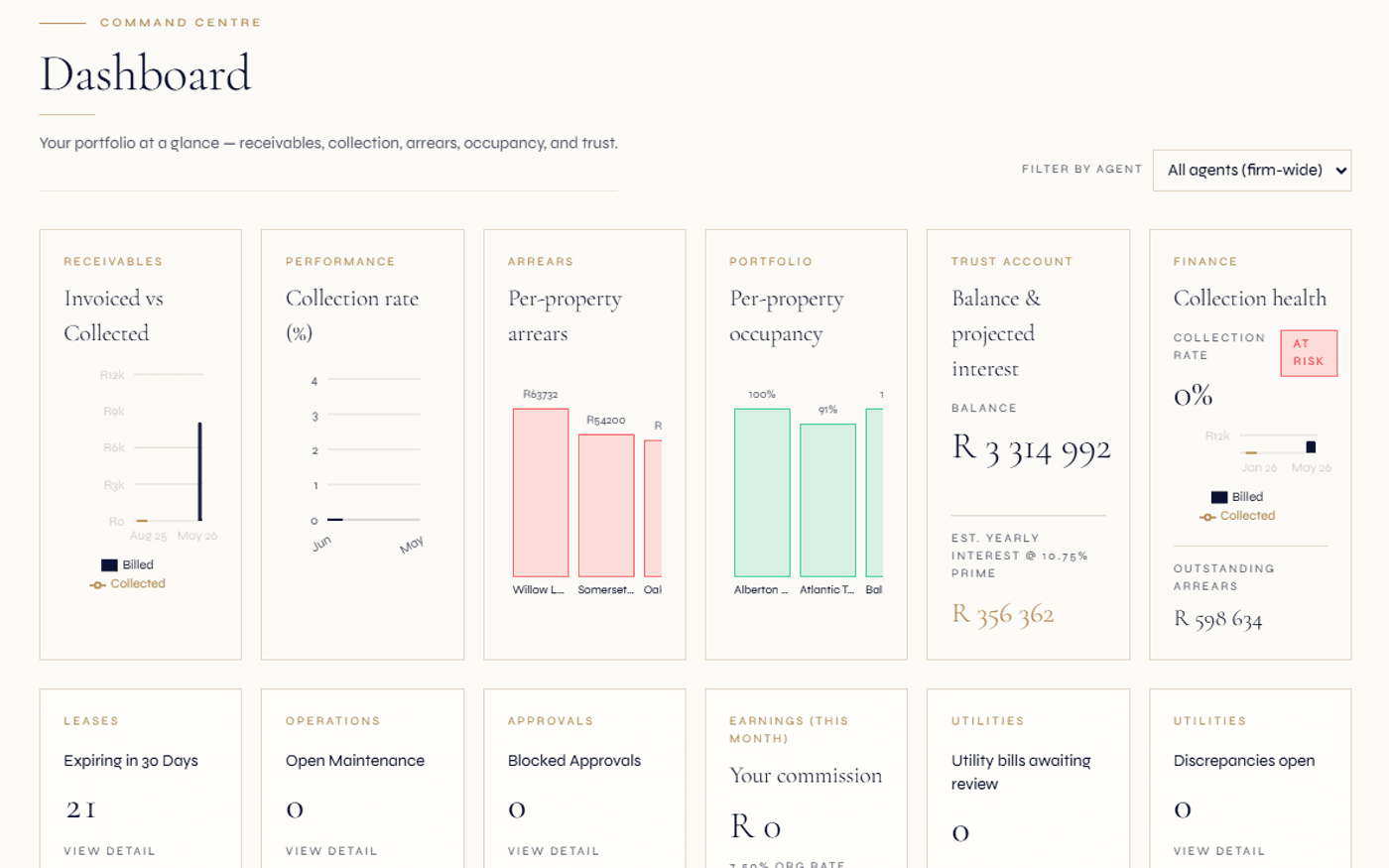
Trustees see the full levy roll with arrears bands — not one unit, the whole scheme.
Owners see their unit. Managing agents run the operation. Trustees govern — and that needs its own portal.
A community scheme has three audiences, and they do not want the same screen. An owner wants their own slice: their levy balance, their statement, their documents, a way to send proof of payment. The managing agent wants the operating console: the levy run, the cashbook, the bank reconciliation, the EFT batch, the compliance planner. Trustees sit between them with a different job entirely — they govern. They approve spending, they watch the scheme’s overall health, they read the rules and resolutions that bind the body corporate, and they prepare for the meetings where decisions get made.
Regalis gives that governance job its own surface. The trustee portal is scheme-scoped, not owner-scoped and not the full agent console. A trustee opens it and sees the things a trustee is accountable for: the approvals waiting on their signature, the health scorecard for the schemes they sit on, the arrears position across the whole roll, the governance documents, and the prep for the next meeting. It is a deliberately narrow, decision-oriented view — the committee’s window, not the office’s.
Because every scheme runs on the same unified record as the rentals book, the trustee portal reads the same numbers the managing agent operates on. There is no separate trustee copy of the ledger to fall out of sync. When the agent posts a levy run or releases an approved payment, the trustee portal reflects it. The trustee acts on live truth, captured with an audit trail, rather than on a monthly export.
Read the full guide
What trustees deal with without a portal
- Supplier payments approved over WhatsApp and email — no record of who signed off, against which invoice, or whether the threshold was met.
- Trustees only learn a scheme is sliding into arrears at the AGM, months after the trend started.
- The constitution, conduct rules and last year’s minutes live in someone’s inbox; finding a past resolution means asking the office.
- Reserve-fund health is opaque to the committee — they trust the agent’s word because they cannot see the segregated position themselves.
- Meeting prep is a scramble of forwarded PDFs, with quorum and proxy counting done by hand on the day.
- A trustee who also owns a unit juggles two logins and never sees their governance role and their owner role in one place.
What the trustee portal gives the committee
- Multi-signatory approvals captured per trustee with reasons and supporting documents — a clean decision trail on every supplier payment.
- The scheme health scorecard on the landing page, so trustees see arrears, reserve and compliance trends as they move, not at year-end.
- Governance documents — constitution, conduct rules, management rules, ratified minutes — one click away, retention-aware.
- Reserve-fund coverage visible as a scored component, sourced from the STSMA s.3(1)(b) segregated accounts.
- Meeting prep from the portal: agenda, documents, RSVPs, proxies and live vote standing once the meeting opens.
- One identity across roles — the trustee who owns a unit sees the governance surface and their owner surface from the same login.
From approval request to clean decision record.
Sign in to the scheme you govern
A trustee lands on the portal scoped to the schemes they sit on. The scheme health scorecard greets them — composite score, rating band, the six-component radar and the 12-month trend — so the first thing they see is where the scheme stands.
- Scoped to your schemes
- Health score on the landing
- Rating band at a glance
Clear the approvals queue
Supplier payments above the configured threshold wait for trustee approval. Each trustee opens the item, reviews the invoice and supporting documents, and approves or declines with a reason. The approval rule tracks how many trustee sign-offs are still needed before the payment can release.
- Multi-signatory approval
- Reason and documents captured
- Released only when satisfied
Oversee arrears and the documents
Trustees review the full levy roll with arrears bands — which units are current, which are slipping — and open the governance documents: the constitution, conduct rules, management rules, ratified minutes and the annual financial statements, all retention-aware.
- Whole-roll arrears view
- Governance document register
- Reserve-fund coverage visible
Prepare for the meeting
Ahead of the AGM or trustee meeting, the committee assembles the agenda, circulates the pack, tracks RSVPs and recorded proxies, and watches the live vote standing as ballots come in. The voting engine — designed to align with STSMA special resolutions and round-robin (written) resolutions — runs underneath.
- Agenda and pack circulation
- RSVP and proxy tracking
- Live participation-quota vote standing
A governance toolkit for the committee, integrated with the scheme.
The trustee portal pulls the governance-relevant surfaces into one place — without duplicating the owner portal or the managing-agent console. Deeper mechanics live on the linked solution pages.
Multi-signatory approvals
Configurable approval requirements per scheme — for example, two of three trustees for payments above a threshold. Each trustee’s decision is captured with a reason and supporting documents; the payment releases only when the rule is satisfied.
Scheme health scorecard
The composite 0-100 score on the landing page, with rating band, six-component radar breakdown and 12-month trend. Trustees see compliance, arrears and reserve trends without asking the agent.
Levy-arrears oversight
The full levy roll with arrears bands across the whole scheme — read-and-oversee, not unit-scoped. The recovery work runs on the levy-collection engine; the portal surfaces the position to govern.
Governance documents
Constitution, conduct rules and management rules, plus ratified AGM minutes and annual financial statements — retention-aware documents a trustee can open without phoning the office.
Reserve-fund visibility
Reserve-fund coverage appears as a scored component, sourced from the STSMA s.3(1)(b) segregated accounts. The committee sees the ring-fenced position instead of taking it on trust.
Meeting & AGM prep
Assemble the agenda, circulate the pack, track RSVPs and recorded proxies, and follow the live vote standing once the meeting opens. The participation-quota voting engine, designed to align with STSMA requirements, runs underneath.
Trustees register
Trustees join the scheme with a role — chair, treasurer, secretary or member — and appear in the firm-wide team directory with a Trustee badge. The register drives who can sign which approvals.
Conduct-rule oversight
The committee sees conduct-rule offences and the warning → penalty → fine escalation per scheme. Charges post to the owner’s ledger when a fine is issued, with the trail visible to trustees.
Compliance & resolution trail
The CSOS-aligned compliance planner and the record of past resolutions sit alongside the documents — AGM scheduling, CSOS levy submission, annual financial statements, reserve-fund top-up, each with its audit trail.
Budget vs actual
Trustees review the annual budget against actuals — month-by-month, YTD, variance and percentage drift — the same figures the managing agent posts, on the same unified ledger.
Decision audit trail
Every approval, decline and ratified resolution is captured against the scheme with who, when and against what. If a matter is referred to CSOS, the governance record is one place to assemble the evidence.
One identity, two roles
A trustee who also owns a unit is the same person on the platform. The governance surface and their owner surface read from one login — no second account, no duplicated record.
Trustees govern under STSMA, CSOS and the Property Practitioners regime — the portal lines up to each.
South African community schemes operate under a layered regulatory stack, and trustees carry duties under each part of it. The Sectional Titles Schemes Management Act (STSMA, 2011) governs how a body corporate is run — including the requirement under section 3(1)(b) that the body corporate establish and maintain both an administrative fund and a reserve fund. The Community Schemes Ombud Service Act (CSOS, 2011) establishes CSOS as the dispute-resolution and oversight body. The Property Practitioners Act (PPA, 2019) overlays the managing-agent registration and trust-account regime that the committee relies on.
The trustee portal is built so that the committee can see and act within that shape. Reserve-fund coverage surfaces as a scored component drawn from the segregated accounts STSMA s.3(1)(b) requires. The CSOS registration number and dispute references sit in the compliance planner the trustees oversee. Supplier-payment approvals run through the multi-signatory trail so a committee can demonstrate that spending decisions followed the scheme’s own governance rules.
None of this is legal advice. The portal surfaces the public regulatory concepts accurately and keeps a clean record of what the committee decided — it does not interpret the Acts for a particular scheme or resolve a binding question. Where a scheme needs a determination, the trustees take advice and the platform holds the evidence. Informational only — not legal advice.
Continue exploring how Regalis handles the rest of the rental operation.
Scheme health scorecard
The composite 0-100 score behind the trustee landing — six weighted components, radar breakdown, 12-month trend, four rating bands.
Read moreAGM & meetings software
The voting engine trustees prepare for — participation-quota special resolutions, owner self-RSVP, proxy forms and round-robin (written) resolutions, designed to align with STSMA.
Read moreScheme owner portal
The owner-scoped counterpart — one owner, one unit, their levy statement, documents and requests. Distinct from the trustee governance surface.
Read moreCommunity schemes platform
The full HOA, body corporate, sectional title and share block platform — levy roll, reserve-fund segregation, transfers and CSOS compliance.
Read moreCommunity scheme management
How Regalis runs scheme and rental books on one unified record — for managing agents serving both at once.
Read moreCommon questions
Common questions about the trustee portal.
What is the trustee portal, and who is it for?+
The trustee portal is the governance surface for the people who run a community scheme — the trustees of a body corporate or sectional title scheme and the directors of a Homeowners Association. It is distinct from the owner portal (which gives an individual owner a window onto their own unit) and from the managing-agent views (which run the day-to-day operation). A trustee signs in to approve supplier payments, read the scheme health scorecard, open governance documents, oversee levy arrears across the whole roll, and prepare for the next meeting.
How do trustee multi-signatory approvals work?+
For supplier payments and other governance actions, the platform supports configurable multi-signatory approvals — for example "2 of 3 trustees must approve any payment above R20 000". Each named trustee makes their own decision from their portal: approve or decline, with a reason and the supporting documents attached. The decision trail captures who approved, who declined, when, and against which invoice. Once the required number of approvals is satisfied, the payment is released into the payment batch; until then it waits. Informational only — not legal advice.
Can trustees see the scheme health scorecard?+
Yes. The composite 0-100 scheme health score appears prominently on the trustee portal landing — the score, its rating band (Excellent, Healthy, At risk or Critical), the six-component radar breakdown and the 12-month trend chart. Trustees do not have to ask the managing agent to explain where the scheme stands; the rationale is on the card. The deeper mechanics live on the dedicated scheme health scorecard page.
What governance documents can a trustee open?+
Documents the managing agent has linked to the scheme — typically the constitution, the conduct rules and the management rules, plus ratified AGM minutes and the annual financial statements — are available to trustees as retention-aware documents. A trustee reads the rules that bind the scheme and the record of past resolutions without phoning the office or waiting for the next pack.
How is arrears oversight different from what owners see?+
An owner only ever sees their own unit. A trustee sees the full levy roll with arrears bands — which units are current, which are in arrears, and how the scheme is tracking overall. The trustee view is read-and-oversee: the structured recovery work (reminders, age analysis, the CSOS evidence pack) runs on the levy-collection engine the managing agent operates. The trustee portal surfaces the position so the committee can govern it.
Does the portal help with meeting and AGM preparation?+
Yes. Trustees prepare from the portal: the agenda for the next meeting, the documents to circulate, the RSVPs received, the proxies recorded and the live vote standing once the meeting opens. The full voting workflow — designed to align with STSMA requirements for special resolutions, owner self-RSVP, pre-filled proxy forms and round-robin (written) resolutions — lives on the AGM and meetings page; the trustee portal is where trustees act on it.
How is the trustee portal different from the owner portal?+
They serve different people and show different data. The owner portal is owner-scoped: one owner, one unit, their levy statement, their documents, their requests. The trustee portal is scheme-scoped and governance-oriented: the whole roll, the health scorecard, the approvals queue, the meeting prep. A person who owns a unit AND serves as a trustee is the same identity on the platform, but the two surfaces show them different things in different roles.
Is the trustee portal POPIA-aware, and does it respect the regulatory shape?+
Trustees see scheme-level data appropriate to their governance role, under the same consent and privacy-request workflows as the rest of the platform — designed to support POPIA-aligned consent, retention and data-subject handling. The portal is structured to align with the layered South African regulatory framework — reserve-fund segregation, CSOS registration and dispute references, and the managing-agent trust-account regime under the Property Practitioners Act. Where a binding interpretation is needed, take advice. Informational only — not legal advice.
Stop governing schemes over email.
One portal for the committee.
Walk through the trustee approvals queue, the scheme health scorecard, the governance documents and the meeting-prep flow with someone from the team.