Landlord portal software
a self-serve portal for landlords.
One place for landlords to see properties, leases, statements, expected payouts, approvals, managing-agent fees, year-end reports and a bank-notification feed for self-settled rent. Branded under your agency, scoped per landlord.
- Bank-notification feed
- Statements + tax packs
- Approvals queue
- Trust balance visibility
Every property, unit and active lease in one filterable surface.
For leases settled direct to the landlord, rent matches against the landlord's own bank notifications.
Annual reconciliation, tax-pack export, lockable financial year.
Landlords used to have to ask. Now they can see.
The traditional managing-agent relationship runs on monthly statements emailed as PDFs, with the landlord chasing the agent for in-between details. "How is the new tenant settling in?" "Did rent clear this month?" "Why is the trust balance lower than I expected?" Each question becomes an email, each email becomes a delay, each delay erodes the relationship.
The landlord portal flips that dynamic. A landlord logs in and sees what is actually happening: properties they own, active leases, current rent status, trust balance, expected payouts, approvals waiting, MA fees owed, year-end tax pack. The same data the managing agent works on, scoped to that landlord, branded under the agency.
For agencies, the portal is not just a feature — it is a retention tool. Landlords who can see their portfolio do not chase. Landlords who do not chase stay longer. And when they do leave, the data export is clean enough that the transition itself becomes professional.
Read the full guide
The way landlord visibility usually works
- Statement is a PDF emailed once a month — and only shows what the last month did, not what is currently happening.
- Approvals come over WhatsApp or email; the landlord struggles to keep track of what they decided when.
- Expected payout is a guess until the EFT lands; if it does not land on time, the landlord assumes the worst.
- Year-end the landlord asks the MA for an annual report — and the MA spends a week building it from scratch.
- Tax season the landlord's accountant needs every income and expense line — and again it is a rebuild from PDFs.
The way Regalis runs it
- Live portal — properties, leases, statements always reflect what the operating record currently says.
- Approval queue with one-click decide; decisions are stamped and surfaced in audit history.
- Expected payouts are calculated from current rent receipts; trust balance is live, not stale.
- Annual reconciliation runs are stored; the landlord downloads them when they need them.
- Tax packs roll up the year per landlord with line items by property, ready for the accountant.
What a landlord actually does in the portal.
Log in and see the portfolio
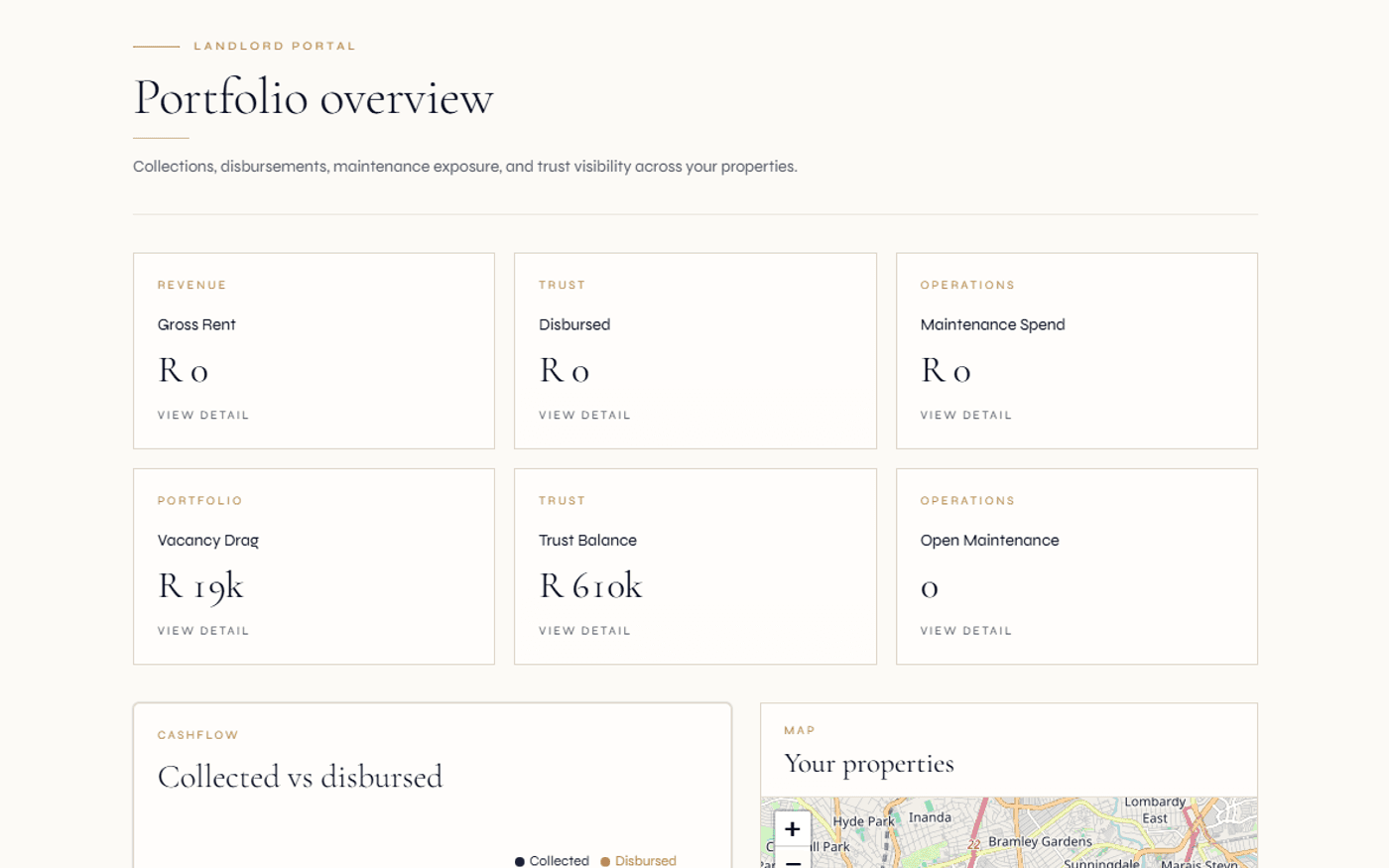
The landlord signs in and lands on their dashboard: count of properties, active leases, expiring leases, expected income this period, current trust balance, and approvals waiting for a decision. Tiles drill into per-property detail.
- Per-landlord dashboard tiles
- Drill into property → unit → lease
- Expected payouts visible
Check rent status and statements
The landlord opens their statements to see a breakdown per lease and per period. Each statement shows what was invoiced, what was received, and what remains. The trust balance updates as receipts arrive, and any statement can be downloaded as a PDF for the accountant or for personal records.
- Per-lease + per-landlord statements
- PDF download on demand
- Trust balance live
Decide approvals
When a managing agent requests landlord approval — creating a lease, changing rent, starting an eviction or removing a property — the landlord sees the request on the dashboard with full context, including a summary of what is being requested and the agent's notes. One click to approve or decline with a reason.
- In-app + email notification when approval requested
- Full context on approval card
- Decision audit-stamped
Year-end reports & bank-notification feed
Annual reconciliation and tax packs are produced per financial year, downloadable from the portal. For leases settled direct to the landlord, the landlord can manage their own bank-notification feed to automatically match incoming EFTs against the right lease.
- Annual reconciliation PDF
- Tax pack CSV + PDF per year
- Bank-notification feed for self-settled rent
Everything a landlord needs to feel in control.
Portfolio dashboard
Landlord-scoped dashboard with property count, active leases, expiring leases, expected income, current trust balance, approvals waiting, MA fees owed.
Properties & units
Filterable list of properties, drill into per-property view with units, leases, occupancy split, ticket volume and lease balance column.
Statements per lease
Per-lease statements with full invoice + receipt detail. Per-period filtering. PDF download for the landlord or their accountant.
Trust balance + payouts
Live trust balance for the landlord's trust account. Expected upcoming payouts computed from current rent receipts and known schedule.
Approvals queue
An "Awaiting your decision" tile on the dashboard lets the landlord approve or decline each request with a reason. Email notification per request.
MA fee invoices
"Owed to your managing agent" section showing the management-fee invoice each month. Settle directly or hand off to your bookkeeper.
Bank-notification feed
For direct-to-landlord leases, the landlord can add their bank notifications endpoint. Receipts auto-match to leases; status visible inline.
Tax packs
Per-landlord annual tax pack with line items grouped by property and category (rent income, utilities, maintenance, MA fee, commission, depreciation hints).
Annual reconciliation
Per-landlord annual reconciliation summarising the financial year, stored as a PDF and downloadable from the portal.
Maintenance status
Read-only view of open and recent maintenance requests across the landlord's portfolio. Costs visible without forcing the landlord into the MA's workspace.
Documents
Lease documents, year-end reports, statements and tax packs all in one place. Retention-aware, and designed to support POPIA-aligned retention and data-subject workflows.
Co-ownership support
Multiple users can represent the same landlord (for example spouses on a co-owned property) with optional share percentages.
Why most leases now default to direct-to-landlord.
Residential rent has traditionally flowed through the agency trust account. More recently, many agencies have moved toward settling monthly rent direct from tenant to landlord under the right mandate, while keeping deposits in trust — an approach designed to align with current South African property-practitioner requirements. Always confirm the right mandate structure with your own compliance advisor.
New leases default to direct-to-landlord settlement precisely because it is the cleaner path under the new regime. Trust ledger only sees deposits. Rent flows operationally. Audit surface shrinks. Landlord cashflow improves because rent does not pause in trust between collection and payout.
For landlords who prefer agency-settled rent (often older mandates or specific cashflow arrangements), the lease can be set to agency-trust mode and rent flows through the trust ledger before disbursement. The platform supports both — but the default reflects where most SA agencies are now heading.
Continue exploring how Regalis handles the rest of the rental operation.
Managing agent software
The agency-side experience that produces the landlord portal — view-as oversight, fee invoicing, approvals.
Read moreTrust accounting
Per-landlord trust accounts that back the landlord's portal balance and statements.
Read moreRental arrears collection
Arrears workflow that explains why a landlord's expected payout might be down this month.
Read moreCommon questions
Common questions about the landlord portal.
What does a landlord see in their portal?+
A landlord sees their own portfolio: properties they own, units, active leases with key dates and balances, statements per lease and per period, expected payouts from the trust account, current trust balance, approvals waiting for their decision, invoices owed to the managing agent (if applicable), year-end reports and tax packs, and an optional bank-notification feed for direct rent settlement.
How does the landlord bank-notification feed work?+
For leases settled direct-to-landlord, the landlord adds their own bank notifications to the platform. Incoming EFT alerts feed into the platform, auto-match to the lease, and update the lease balance. The trust ledger stays out of it. The landlord controls this from their own portal.
Can landlords approve actions from their portal?+
Yes. When a managing agent requests approval (lease creation, rent change, eviction, property removal, maintenance commit above threshold), the landlord sees an "Awaiting your decision" tile on the dashboard. One click to approve or decline with a reason. Decisions are timestamped and logged; an in-app and email notification goes out when approvals are pending.
Do landlords see statements per property or per landlord?+
Both. The default statement is per landlord (across all properties they own). Per-property statements are available on demand, and statements can be drilled down to lease level. Year-end tax packs are produced per landlord with line items by property and category, suitable for the landlord's tax preparer.
Can multiple users represent the same landlord?+
Yes. Multiple users can be linked to one landlord, with optional share percentages for co-ownership. Each user gets their own portal access with their own credentials; all see the same landlord book.
Are landlord-direct operators supported even without a managing agent?+
Yes. In landlord-direct mode, the entire platform runs under a landlord operator. The experience adapts — fewer approval flows, more direct control over rent flows, and no managing-agent fee invoicing. The same portal becomes the landlord's primary operational surface rather than a self-service window into someone else's platform.
See everything built for you — explore the property managers hub
Stop emailing statements.
Let landlords see for themselves.
Walk through the landlord portal, the bank-notification feed flow, and the approvals queue with someone from the team.